

Every screen in the room, right on cue.
Cuevio is a multi-screen media server for the Mac. It plays back and maps video across screens, projectors and LED walls, every output on its own cue list, for churches, events, theatre and rental houses.
The download isn't available right now. Please try again shortly, or get in touch.
- Transitions
- 26
- Blend modes
- 17
- Stackable effects
- 12
- Live input types
- 8
- Stream Deck actions
- 27
- Macs per license
- 2
Why Cuevio
Every output runs its own list
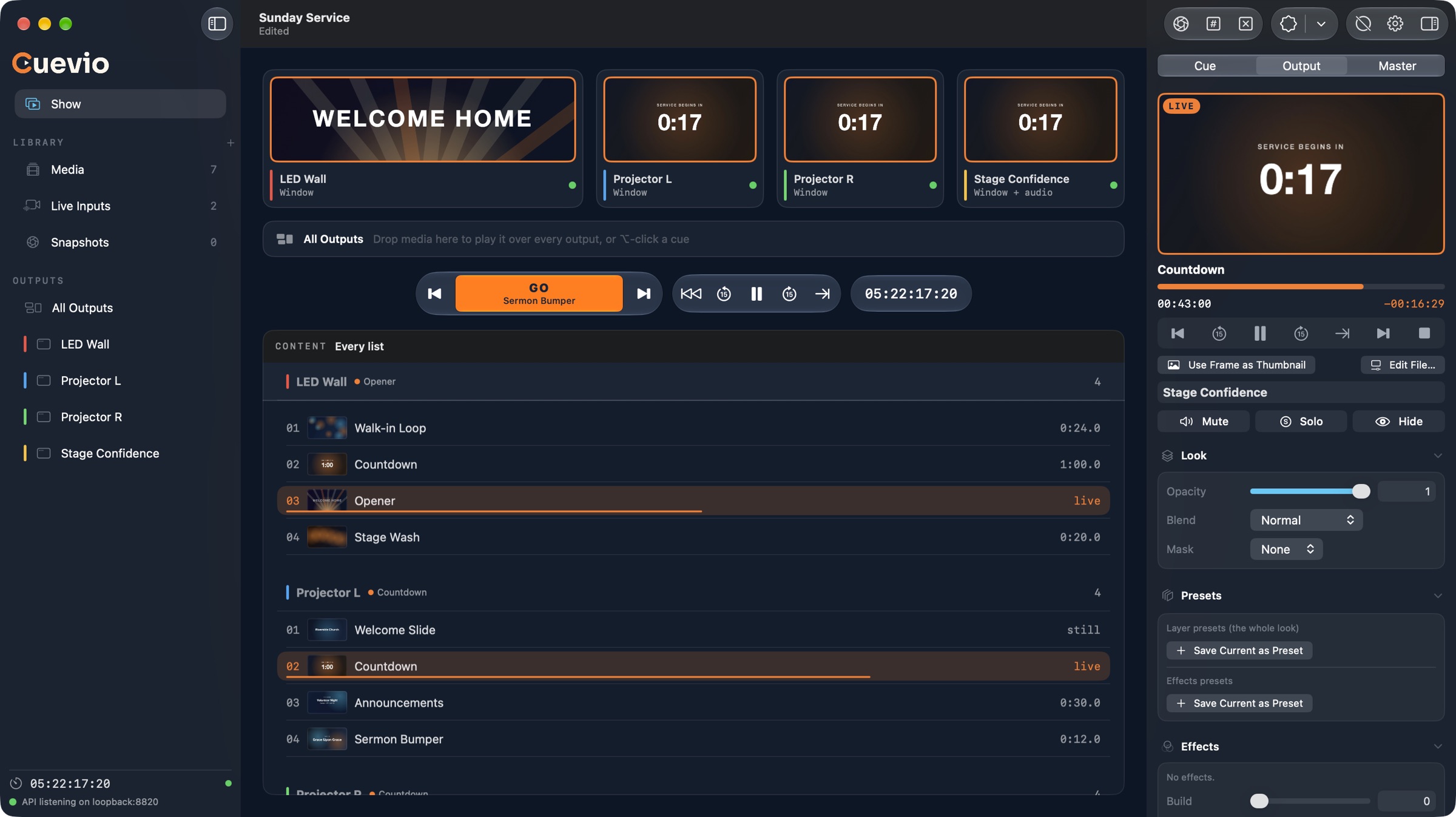
The LED wall loops a background while the side projectors count down and the confidence monitor shows what's next. In Cuevio each output plays its own cue list, independently, and one press of GO steps the output you're on. When everything should show the same thing, All Outputs takes over every screen at once, and Release hands each one back.
- Drag media, a live input or a whole library folder onto an output to add it
- A copy fired on a second output joins in sync, frame for frame
- Fade to black, show a logo or turn off one output or all of them
- Unlicensed copies run fully: outputs are watermarked, the show never stops
- Library
- Media in folders, live inputs and snapshots, ready to drop onto an output.
- Cue
- An item in an output's list, with its own transition and what to do when it ends: play once, hold, loop or advance.
- Output
- A display, a window, an NDI stream or a Syphon feed, with its own list, look and audio.
- All Outputs
- One list that plays over every output at once, then releases each back to what it was showing.
Features
Everything the booth needs, on one Mac
- Output wall Every output live, side by side.
- All Outputs One cue over every screen, then Release.
- GO Steps the selected output to its next cue.
- Transport and timecode Play, skip ±15 s, last 30 s, show clock.
- A list per output Live and next marked, with durations.
- Library Media in folders, live inputs, snapshots.
- Outputs Displays, windows, NDI and Syphon. Drop media on one.
- Now playing Clocks, scrub bar and transport for the output.
- Looks 17 blend modes, masks, 12 effects, presets.
- On-air buttons Snapshot, identify, clear, logo, fade to black.
Also in the box
- Mapping
- Corner-pin and mesh warp, soft edge blends.
- Audio per output
- Its own device or NDI stream, with delay.
- Main and backup
- A backup Mac takes over in 2 seconds.
- Live inputs
- SDI, HDMI, cameras, NDI, Syphon, ProPresenter.
- Stream Deck
- 27 actions for keys and dials.
- Never stops
- Own render thread, autosave every 1.5 s.
Show control
Fire from the console, the script or the timeline
Every way in becomes the same command, so a lighting desk, a MIDI controller, a timecode track or your own script can run the show beside the operator.
Licensing
Buy it once, or rent it for the show
Try everything free first. Without a license Cuevio runs fully and its outputs carry a watermark; it never stops a show. A license removes the watermark.
Perpetual
$599One-time purchase
- Never expires
- Active on 2 Macs at a time, such as main and backup
- Works offline after activation
- Move it to a new Mac whenever you like
Rental · 7 days
$79One-time, for 7 days
- For a single event or a weekend
- Active on 2 Macs at a time
- Works offline after activation, right up to its end date
- Doesn't renew
Rental · 30 days
$199One-time, for 30 days
- For a run of shows or a touring month
- Active on 2 Macs at a time
- Works offline after activation, right up to its end date
- Doesn't renew
Checkout opens soon. In the meantime, download Cuevio and build your show on the free trial.
We'll email your license key and a download link. When a rental ends, outputs are watermarked again, but playback is never interrupted. Checkout and licensing are handled by Polar, our merchant of record.
Download
From download to first cue in minutes
Cuevio is distributed directly rather than through the Mac App Store, because it needs things the App Sandbox doesn't allow, such as serial ports for deck control and the NDI and Syphon frameworks.
- Download the installer and open it.
- Follow the prompts; Cuevio lands in
/Applications. - Open Cuevio and start building your show on the trial. When you have a key, choose License in the sidebar to activate it.
System requirements
- macOS 27 or later
- A Mac with Apple silicon and its Metal GPU
- Media in any format macOS plays; ProRes cues and seeks fastest, H.264 and HEVC work too
- An internet connection once, to activate a license key
- Optional: the NDI runtime (NDI Tools) for NDI inputs and outputs
- Optional:
Syphon.frameworkin/Library/Frameworksfor Syphon
FAQ
Questions from the booth
Does Cuevio need the internet during a show?
No. Activating a key needs an internet connection once; after that Cuevio works offline. A perpetual license stays valid and a rental runs to its end date, online or not.
Our playback machine is air-gapped. Can it be licensed?
Yes. Reply to your license email, or get in touch, with the Machine ID shown under License in Cuevio on that Mac, and we'll send you an offline activation file.
How many Macs can use one key?
Two at a time, so a main and a backup machine are covered by a single license.
How do I move my license to a new Mac?
On the old Mac, choose License in the sidebar and click Deactivate, then activate the key on the new one. If the old Mac is gone or won't start, deactivate it from the customer portal instead.
What happens when a rental ends?
Outputs are watermarked again, just like the trial. Playback is never interrupted, so a show that runs past the end date keeps going. Activate another rental or a perpetual key to remove the watermark. Your license email says exactly when the rental ends, and rentals never renew on their own.
What can I do without a license?
Everything. Unlicensed copies run every feature, and outputs carry a watermark, so you can build and rehearse a whole show before you buy.
Can I get a refund?
Purchases are processed by Polar, our merchant of record, which sends your receipt. Fees are non-refundable except as required by law or stated at checkout, as set out in our Terms. If something isn't right, get in touch and we'll help.

Ready when the house lights go down
Download Cuevio free, build your show on the trial, and license it when you're ready to go live.