
 Stinger
Hit the moment, every time.
Stinger is a soundboard for the Mac. Put your stings, beds and cues on Boards and fire them from the keyboard, a Stream Deck, MIDI or OSC, for podcasts, live streams, theatre and events.
The download isn't available right now. Please try again shortly, or get in touch.
- Pads per Board
- 80
- Stream Deck actions
- 10
- Shortcuts actions
- 18
- Automation events
- 12
- Retrigger modes
- 4
- Pad colours
- 9
Why Stinger
Every sound one key away
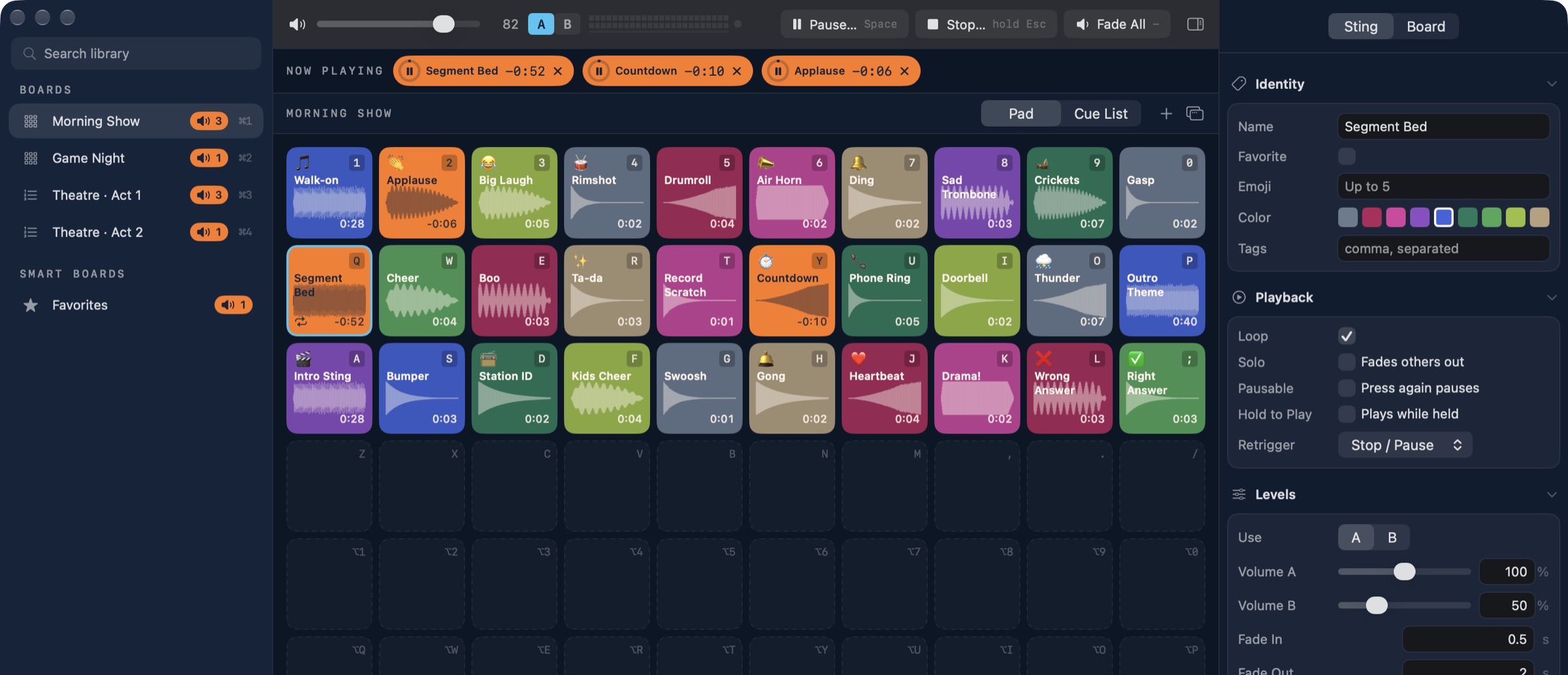
The intro, the applause, the rimshot and the bed under the interview all sit on one Board, and every pad has its own key. Press it and the sound starts at once; press it again and it stops, pauses or restarts, the way you set it. Orange means on air and cyan means next, so you can read the room from across the desk.
- Drag audio from Finder, Freesound or Apple Loops onto a pad to add it
- Files are copied into Stinger's own library, so pads never lose their audio
- Stack sounds freely: the limiter keeps the mix from clipping
- Try every feature free: the trial has no time limit and no locked features
- Sting
- One sound with its own colour, levels, fades, output and what pressing it again does.
- Board
- A page of 80 pads, played as pads or stepped through as a Cue List with GO.
- Smart Board
- Fills itself from rules such as a colour, a tag, favourites or recently played.
- Now Playing
- Everything on air, with time left; click to pause, or stop it from the strip.
Features
Built for the moment it has to work
- Boards Pad Boards and Cue Lists, each on a ⌘ shortcut.
- Smart Boards Fill themselves from colours, tags or favourites.
- Master and A/B Master volume, with A/B presets for quick ducking.
- Pause, Stop, Fade All Space pauses; hold Esc to stop everything.
- Now Playing Everything on air, with time left.
- Pad or Cue List Play pads, or step through with GO.
- 80 pads Each on its own key, with colour and waveform.
- Identity Name, emoji, colour and tags.
- Playback Loop, solo, hold to play, retrigger.
- Levels A/B volumes, fade in and fade out.
Also in the box
- Instant start
- Short sounds preload; long beds stream.
- Routing per Sting
- Its own device and channel pair.
- Built-in editor
- Trim, crop, fade, normalize, undo.
- Find sounds
- Freesound and your Apple Loops.
- Safe on air
- Peak limiter, meter and Board lock.
- Share Boards
- One package, audio included.
Control
Fire from the keyboard, the deck or the console
Every way in becomes the same command, so a Stream Deck, a MIDI pad controller, a lighting desk over OSC or a shortcut can run the show beside the keyboard, and every surface shows what's playing.
Licensing
A free, fair trial. $49 when it earns its place.
Every feature works in trial mode, so you can run a real rehearsal before you buy. Your first 20 Stings play clean; after that, Stinger mixes noise into playback. A Stinger License removes the noise, once, for good.
Trial
FreeNo account, no time limit
- Every feature, including unlimited Boards, Stream Deck, MIDI and OSC
- Your first 20 Stings play clean, then noise is mixed into playback
- Add a license in place: your Boards carry over
Stinger License
$49One-time purchase
- No trial noise, ever
- Never expires, and updates are included
- Active on 2 Macs at a time, such as main and backup
- Works offline after activation
Checkout opens soon. In the meantime, download Stinger and try it out in the meantime.
We'll email your license key and a download link. Checkout and licensing are handled by Polar, our merchant of record.
Download
From download to first sting in a minute
- Download the installer and open it; Stinger lands in
/Applications. - Open Stinger and drag a few sounds onto the pads. Press their keys to play them.
- Bought a license? Choose Stinger ▸ Settings, open License, paste your key and click Activate.
System requirements
- macOS 27 or later
- Audio in MP3, AAC, M4A, WAV, AIFF, CAF or FLAC
- An internet connection once, to activate a license key
- Optional: an Elgato Stream Deck and the Stream Deck app; Stinger installs its plugin from Settings
- Optional: a MIDI controller, or anything that sends OSC
- Optional: a free Freesound API key, for Freesound search
FAQ
Questions from the desk
What does the trial limit?
Nothing is locked. Every feature works, including unlimited Boards, Stream Deck, MIDI, OSC and Shortcuts. Your first 20 Stings play clean; after that, Stinger mixes noise into all playback. A Stinger License removes the noise, and everything you built in the trial carries straight over.
Does Stinger need the internet during a show?
No. Activating a key needs an internet connection once; after that Stinger works offline, and the license never expires.
How many Macs can use one key?
Two at a time, so a main and a backup machine are covered by a single license.
How do I move my license to a new Mac?
On the old Mac, open Stinger ▸ Settings ▸ License and click Deactivate, then activate the key on the new one. If the old Mac is gone or won't start, deactivate it from the customer portal instead.
Do I need a Stream Deck?
No. Every pad has a key on your keyboard, and the mouse works too. A Stream Deck, a MIDI controller or OSC adds more ways to fire, with live state on the keys.
How does Freesound search work?
Freesound asks each app user for their own free API key. Create one at freesound.org, paste it into Stinger ▸ Settings ▸ Discovery and click Test Key. Stinger shows sounds licensed CC0 or CC BY and imports their high-quality preview.
Can I get a refund?
Purchases are processed by Polar, our merchant of record, which sends your receipt. Fees are non-refundable except as required by law or stated at checkout, as set out in our Terms. If something isn't right, get in touch and we'll help.
Ready for your cue
Download Stinger free, try every feature, and add a license when it's ready for the show.